
A mock interview with an AI is a job-interview simulation in which a smart assistant plays the role of the recruiter. It reads the job posting and your background, asks you real questions, listens to your answers, then clearly tells you what works and what falls flat. You repeat it as many times as you want, at midnight or at 7 a.m., stress-free and without having to enlist a friend or relative. The result: on the big day, you've already heard the tough questions and you know what to say. This guide walks you through it, step by step, even if you've never used an AI before. You'll learn three things: how to launch a simulation in a few minutes, what text to give the AI so it becomes a demanding recruiter, and which questions to prepare first. Everything can be done for free on a first try.
Why Train with an AI That Plays the Recruiter
Training with an AI helps you improve faster because you can run through a full interview as many times as you need, at any hour, and get precise feedback on every answer.
The real problem with an interview isn't a lack of experience: it's a lack of practice. You know your answers in your head, but saying them out loud, in the right order, under pressure, is a whole different exercise. An AI gives you an almost unlimited training ground.
Here's what you gain in concrete terms:
- Unlimited repetition: you can redo the same interview five times if you want, until your answer about your weaknesses flows smoothly.
- Zero judgment: you can stumble, get it wrong, start over. The AI won't laugh at you or grade you in front of others.
- Available at any hour: the night before, early in the morning, whenever the stress builds up, the tool answers right away.
- Instant feedback: after each answer, the AI tells you what's convincing and what's still fuzzy, with tips to fix it.
- Tailored to you: you paste in the real job posting, and the questions match the position you're aiming for.
Preparation remains the number one factor in a successful interview, as public employment-support organizations often point out. Practicing with an AI doesn't replace your deeper preparation (knowing the company, your examples, your numbers), but it strengthens it. If you're a complete beginner with these tools, start by understanding where to begin with AI, then come back here.
Method 1: Your Mock Interview in Skilzy's AI Lab
In Skilzy's AI Lab, you launch an interview simulation without installing any tool: you pick a guided agent, answer two or three framing questions, and the AI runs the interview for you.
The AI Lab is the Skilzy space where you use real AI tools directly, without juggling ten different subscriptions. For a mock interview, you go through a guided agent: a mini assistant that takes you by the hand, asks you two or three starting questions, then does the work.
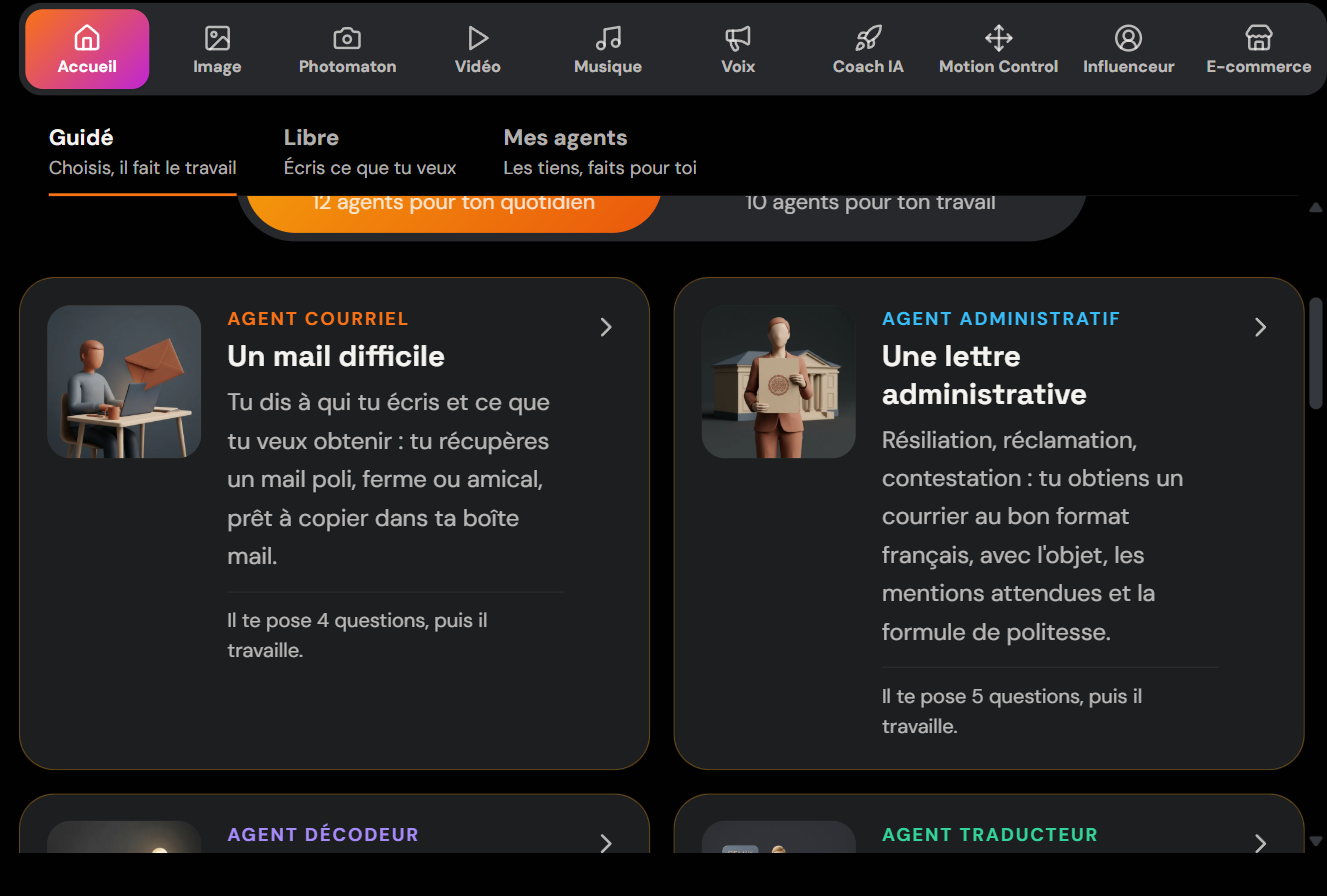
Here are the steps:
- Open the AI Lab, then the Home tab and the Guided section.
- Choose the agent that matches your need (interview prep, responding to a job posting, building an argument).
- Answer the framing questions: the position you're targeting, your experience level, the expected tone.
- Paste in the job posting and two or three lines about your background.
- Start the interview: the AI asks a question, you answer, it moves on and corrects you.
The advantage of the Lab is that everything is included (the credits to use the tools are provided), so you don't pay a separate subscription for each AI. Skilzy brings together more than 15 programs to learn and use AI every day, from writing prompts to creating images, and speaking practice is part of it.
Method 2: ChatGPT, Claude, and the Other Free Assistants
ChatGPT and Claude can also play the recruiter for free: you open the tool, paste in a prompt (a written instruction) and start the conversation.
If you'd rather stick with tools you already know, these assistants do the job very well for a text-based interview. They're conversational assistants: you write, they reply. Their free version is more than enough to simulate an interview, since it's mostly written exchanges.
- ChatGPT (OpenAI): create an account, open a new conversation, and paste in your prompt. Voice mode, available in the mobile app, even lets you answer out loud, just like in a real interview. If you're just starting out, this guide explains how to use ChatGPT as a beginner.
- Claude (Anthropic): very comfortable holding a role and giving nuanced, kind feedback. Here too, an overview of how to use Claude.ai well saves you from fumbling around.
The limits to keep in mind: in the free version, you may hit a message cap during busy hours, and the tool sometimes forgets it's playing a role after a long conversation. The fix takes one sentence: remind it of its role if needed, or start a new conversation with the same prompt.
The Prompt That Turns an AI into a Demanding Recruiter
To turn an AI into a believable recruiter, you need to give it a precise role, the context of the position, and one clear rule: one question at a time, then feedback after each answer.
A good prompt (the instruction text you give the AI) comes down to five ingredients: the role, the position, your level, the desired flow, and the type of feedback. Copy this template, replace the parts in brackets, and paste it into the tool of your choice:
You are an experienced recruiter interviewing me for the position of [job title] at [type of company]. Here's the posting: [paste the posting]. Here's my background in three lines: [your background]. Run the interview realistically: ask one question at a time and wait for my answer before continuing. Start easy, then ramp up the difficulty. After each of my answers, give me short feedback (what's convincing, what's missing, how to improve), rate the answer out of 10, then move on. Start by introducing yourself and asking your first question.
A few useful tweaks:
- For a tougher interview, add: “Be demanding, push back when my answer stays vague.”
- To work on a specific question, write: “Let's focus only on my salary expectations.”
- At the end, ask for a wrap-up: “Summarize my three strengths and my three areas for improvement.”
The more context you give, the more on-point the questions are. Knowing how to write this kind of instruction is a skill in its own right, useful well beyond the interview.
The Interview Questions to Prepare First
Some questions come up in almost every interview: it's better to have worked on them ahead of time with your AI than to discover them face-to-face with the recruiter.
| Common question | What the recruiter is checking |
|---|---|
| Tell me about yourself | Your ability to present yourself in two minutes, clear and job-focused |
| Why this position? | Your genuine motivation and your knowledge of the company |
| Your strengths and weaknesses | Your self-awareness and ability to grow |
| A failure and what you learned from it | How you handle difficulties |
| Your salary expectations | Your preparation and your composure |
| Where do you see yourself in three years? | Your outlook and your consistency |
For each question, prepare a concrete example from your experience (the STAR method: Situation, Task, Action, Result), then ask the AI to challenge you on those answers. Organizations like APEC also offer useful benchmarks on how an interview unfolds, especially for management positions.
Mistakes to Avoid During Your Simulation
The most common mistake is reading your answers instead of saying them: your training should look like the real interview, not a recitation.
Keep these habits in mind:
- Don't recite by heart: speak out loud, even if you hesitate. It's the speaking you're working on, not a text to memorize.
- Don't stop after the first try: the first simulation is for spotting your gaps, the next ones for filling them.
- Don't give a vague prompt: without the posting and your context, the questions stay generic and not very useful.
- Don't take the AI's word for facts: it can be wrong about a specific company. Check the details on the official website before the interview.
- Don't neglect the non-verbal: if you practice over video or voice, watch your pace, your pauses, and your posture.
Conclusion
A mock interview with an AI costs almost nothing and gets you what matters most on the big day: ease. Choose your method (Skilzy's AI Lab for a guided setup, ChatGPT or Claude for a free-form interview), give a good prompt, rehearse the tough questions, and show up relaxed. The best time to train is now.