
A client who lets your invoice drag on isn't always acting in bad faith. Often your email got buried under a pile of others, the invoice is waiting on internal sign-off, or the person simply forgot. The problem is that chasing it makes you uncomfortable: you don't want to come across as the pushy supplier, but you want your money. So you put it off, the unpaid balance settles in, and your cash flow takes the hit. This article gives you a clear method for writing an unpaid invoice email that stays firm on substance and courteous in tone, with copy-paste templates and the right sending rhythm. You'll see how an AI can draft your reminder in thirty seconds, which words to avoid so you don't put anyone's back up, and what the law lets you claim on top of the amount due. The goal is simple: get paid without breaking the relationship.
Why a Badly Worded Reminder Costs More Than Waiting
An effective reminder stays short, factual, and polite: it restates the facts without accusing or threatening in the very first message. Most late payments get sorted with a well-worded email, as long as you don't start off on the wrong foot.
The classic mistake is writing while you're annoyed. A line like „I'm surprised I still haven't been paid" immediately puts the client in the wrong. If they'd simply forgotten, you've just turned an oversight into tension. And if the delay comes from a genuine problem on their end (a slow accounts department, a missing document), you look like someone who accuses before understanding.
A good reminder does three things: it restates the precise invoice details (number, amount, due date), it offers an easy way out („the invoice may have slipped through unnoticed"), and it asks for a clear action („can you confirm the payment date?"). You stay in control of the tone, you keep the relationship, and you get an answer faster. That's exactly what the templates and tools below do.
Method 1: Let a Guided Agent from the Skilzy Lab Write Your Reminder
The fastest route is to describe your situation to a guided AI that asks you two or three questions, then drafts the email for you, with the right tone baked in. No template to hunt down, no phrasing to weigh up: you answer, it writes.
In the Skilzy AI Lab, the Guided tab offers mini agents built for concrete everyday work situations. The „A Difficult Email" card is made for exactly this: you say you want to chase a client about a late invoice, you specify the amount, the due date, and how firm you want to be, and the agent hands you an email ready to send.
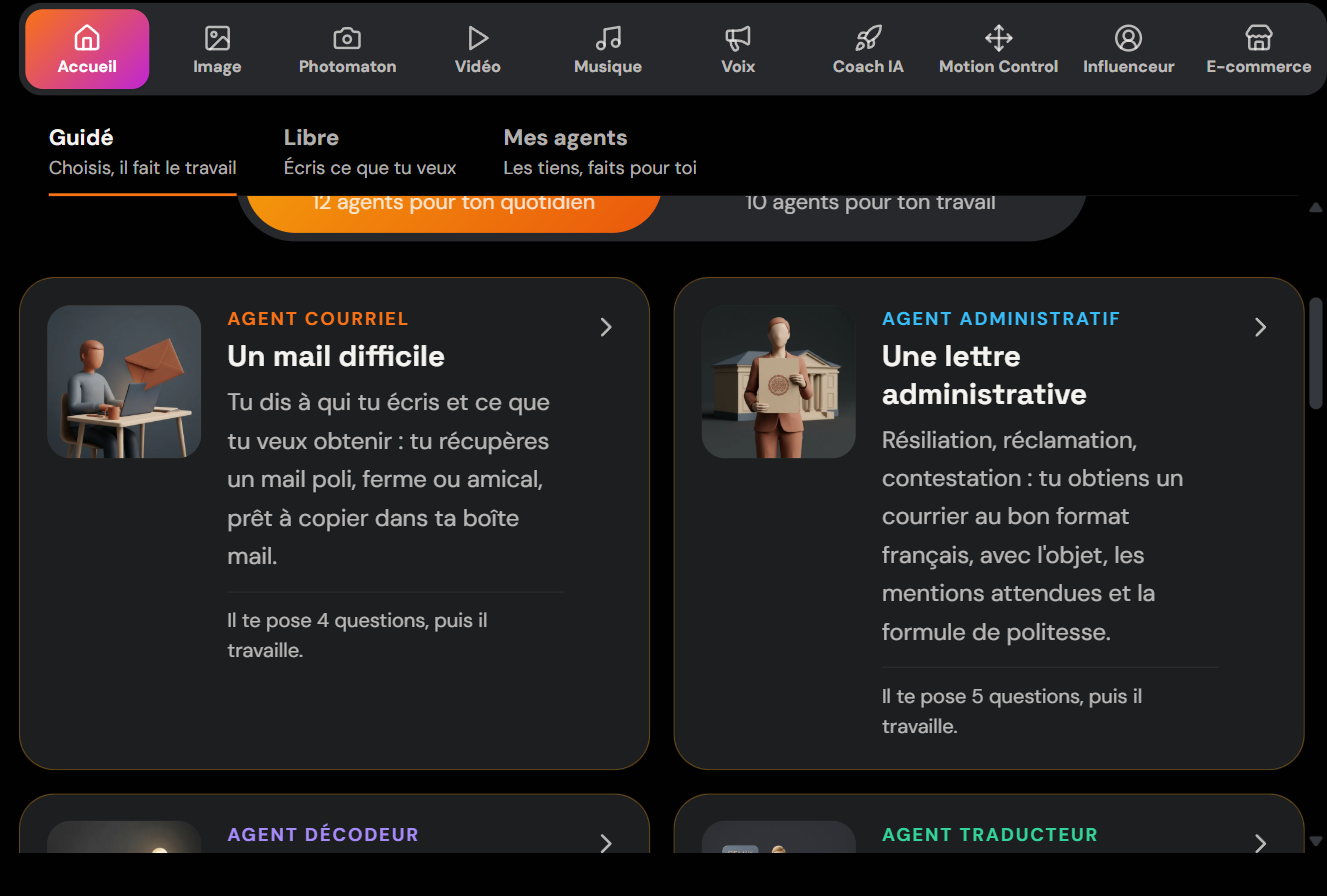
The upside, when you're starting out, is that you don't get stuck in front of a blank page or a prompt you have to write. The agent guides you, and you tweak a couple of words if needed. You can ask it for three versions: a gentle reminder, a firm reminder, and a formal notice. You keep the right one, personalise the first name and invoice number, and hit send.
If managing your clients becomes a real topic, the become an AI freelancer programme teaches you to use these tools day to day to invoice, chase, and track your business without spending your evenings on it.
This approach combines well with the rest of your setup: if you want to industrialise your sends, read our guide on how to automate your emails with AI.
Method 2: Start from a Reminder Email Template to Personalise
If you'd rather keep full control, a good reminder email template always follows the same structure: clear subject line, restatement of the facts, precise request, courteous sign-off. Here's a template you can copy as is and adapt.
Subject: Invoice No. 2026-084: friendly reminder
Hi [First name],
Hope you're doing well. Just a quick reminder about invoice No. 2026-084, for the amount of 1,200 euros, which fell due on 10 August. It may have slipped through unnoticed on your end. You'll find it attached. Could you confirm the planned payment date?
Many thanks and have a great day, [Your signature]
The tone hardens very gradually across the reminders. Here's how to adapt the same email depending on the stage:
| Stage | Tone | Key phrase |
|---|---|---|
| Reminder 1 | Friendly | „It may have slipped through unnoticed." |
| Reminder 2 | Neutral and factual | „Unless I'm mistaken, this invoice remains unpaid to date." |
| Reminder 3 | Firm | „Without payment within 8 days, I'll be obliged to apply the penalties provided for." |
Always keep the subject line precise, with the invoice number: it makes the email easy to find and serious. Avoid capitals, multiple exclamation marks, and passive-aggressive turns of phrase. A well-written template saves you from reinventing the wheel for every client, but remember to adjust it: a copy-pasted email with the wrong first name makes a bad impression.
Method 3: Automate Reminders with Your Invoicing Software
Most invoicing software includes a free automatic reminder feature that sends an email on your behalf on dates you set. If you issue a lot of invoices, this is the most time-efficient option.
Tools like a standard invoicing app (often included in your accounting package or management tool) let you schedule a sequence: a reminder the day before the due date, another 3 days after, a final one at 15 days. The system sends the emails, attaches the invoice, and stops the sequence as soon as payment lands. You don't have to worry about a thing until a client replies directly.
The limit of this method is the tone: automated messages are generic and sometimes cold. For a big strategic client, a manual, personalised reminder is still preferable. The best practice is to combine the two: automation for the everyday flow, a hand-written email (with or without AI) for sensitive cases.
If you want to go further with automating your operations, our article on business automation with AI breaks down the building blocks to connect invoicing, reminders, and tracking.
The Right Reminder Sequence: How Many Emails and at What Rhythm
Three to four spaced-out reminders are enough in the vast majority of cases, ramping up in firmness without ever insulting the client. Too many reminders too close together are annoying; too few let the unpaid balance settle in.
Here's a sequence that works for a business-to-business invoice:
- Day 3 after the due date: first reminder, friendly tone. You assume it's an oversight.
- Day 10: second reminder, neutral and factual tone. You restate the due date and ask for a firm payment date.
- Day 20: third reminder, firm tone. You mention late-payment penalties and offer a call to unblock the situation.
- Day 30: formal notice by email (and ideally by registered letter). This is the last step before proceedings.
Between two emails, a short phone call often changes everything: it shows you're following the case closely and lets you understand any hold-up. Keep a written record of every exchange: in the event of a dispute, that history counts. And never wait two months to send the first reminder; the longer you wait, the more normal the unpaid balance looks to the client.
What the Law Lets You Claim
Every business-to-business invoice paid late gives rise to late-payment penalties and a flat-rate 40-euro collection-fee compensation, provided for by commercial law. Mentioning this in your firm reminder isn't aggressive at all: it's your right.
In practice, from the day after the due date, you can apply late-payment penalties (the rate must appear on your invoice; failing an agreement, a legal reference rate applies). On top of that comes a flat-rate 40-euro compensation per invoice to cover your collection costs, due automatically for any late business payment. You can check the official rules on late-payment penalties between businesses and the provisions on the flat-rate 40-euro compensation on the government sites.
These mentions should only come out from the third reminder onwards, so as not to dramatise too early. Politely reminding the client that the law provides for these fees is often enough to unblock a payment, without you actually having to charge them. If the client stays silent after the formal notice, you can consider an order to pay, a simple and inexpensive procedure for undisputed debts.
Conclusion
Chasing an unpaid invoice is no confrontation: it's a chain of calm, precise, and increasingly firm messages. Choose your method based on your time and the number of invoices: a guided AI to draft quickly and well, a template to personalise if you like keeping control, or your software's automation for the everyday flow. Apply the right sequence, keep your written records, and remind clients of your rights at the right moment. You'll be paid faster, and your clients will keep working with you.