
Every Sunday night, the same question comes up: what are we eating this week? You open the fridge, jot down two or three ideas, forget half the ingredients at the supermarket, and by Wednesday you end up ordering a pizza. Artificial intelligence solves this headache in a few minutes. You give it the number of people, your constraints (time, budget, allergies), and it hands you seven balanced dinners with a grocery list sorted by aisle.
In this guide, you'll discover three concrete ways to create your weekly meal plan and an automatic grocery list: first with Skilzy's AI Lab, then with a free assistant like ChatGPT, and finally with dedicated meal-planning apps. Each method is explained step by step, with the exact prompt to copy. You don't need any technical skills—just the ability to write down what you want to eat.
Why plan your weekly meals with AI?
Planning your meals with AI saves time and money and cuts down on waste: with a single request, you get balanced menus and a complete grocery list, instead of improvising every night. It's the difference between thirty minutes of thinking spread across the week and five minutes once and for all.
Waste is a real expense. According to ADEME, each person in France throws away nearly 30 kg of food per year on average, part of it from poorly planned purchases. When you head to the supermarket with a precise list, based on recipes you'll actually cook, you buy less and throw away less.
AI also helps you add variety and keep things balanced. You can ask it to alternate between meat, fish, legumes, and vegetarian dishes, following the broad principles of the official nutrition guidelines from the Manger Bouger program. In short: you delegate the tedious part (coming up with ideas, making the list) and keep the pleasure of cooking.
Method 1: Generate your menus and grocery list with Skilzy's AI Lab
The simplest way to create your menus and grocery list is Skilzy's AI Lab: you pick a guided agent, answer two or three questions, and it writes everything for you. No blank page, no prompt to dream up—the tool asks you the right questions in the right order.
In the AI Lab, go to the Home tab, then the Guided section. There you'll find a catalog of mini agents, each designed for a specific task. You pick one, it asks you for the number of people, your constraints, and your preferences, then it sends back a complete menu and its grocery list.
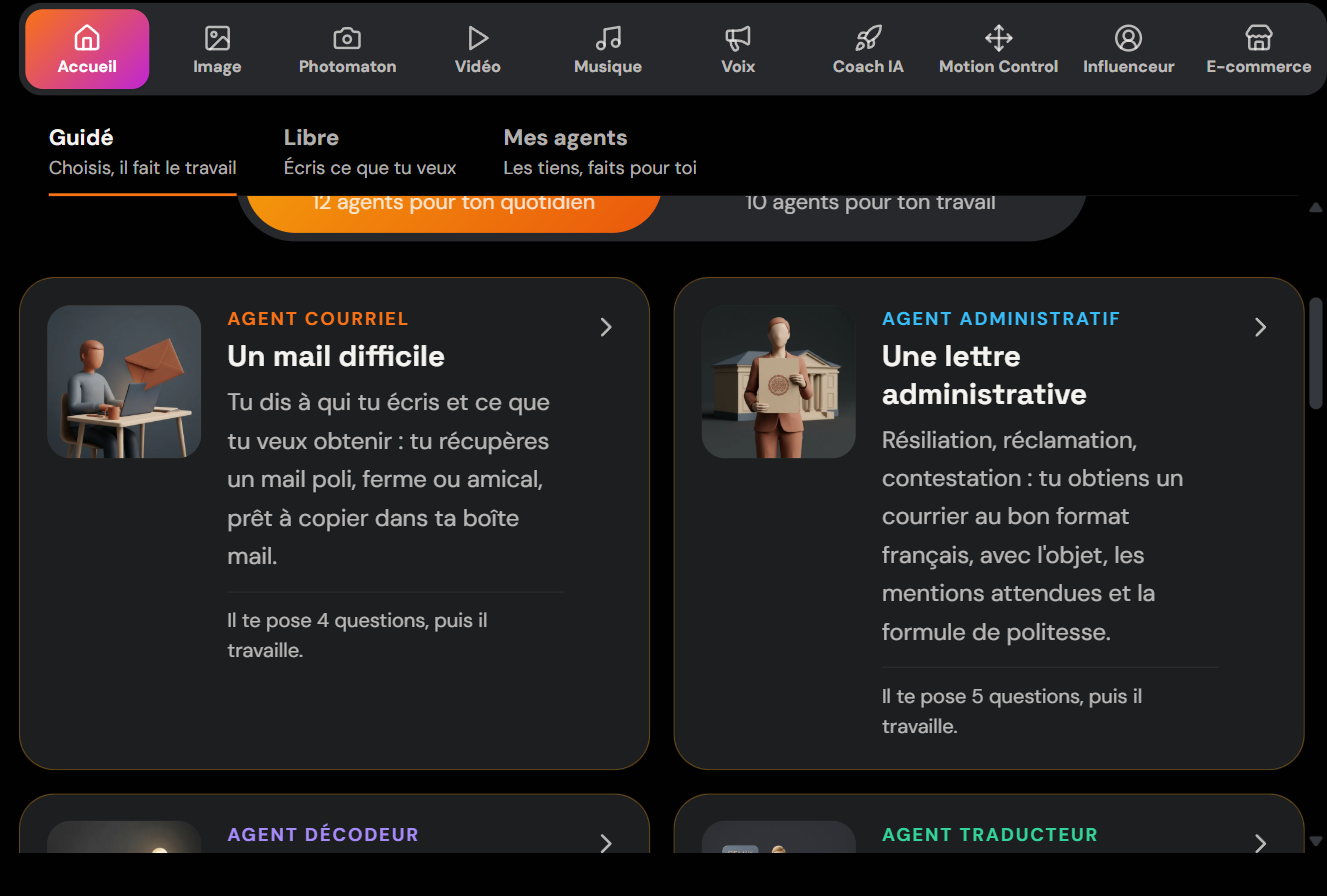
The point of the Lab is that you use real AI tools directly in the platform, with credits included, without piling up subscriptions. Skilzy is a French platform for learning and using AI day to day, and this meal organization is just one example of what you can automate once you get the hang of it. If you want to see everything that's covered, take a look at Skilzy's various programs: writing, images, automation, and plenty of other practical uses.
Method 2: Use a free AI assistant like ChatGPT
A free AI assistant like ChatGPT does the job too: you open a conversation, paste your prompt, and get your menus in a single reply. It's the all-purpose solution, handy if you already use the tool for other things.
The process is simple. You open a new conversation, write your request (you'll find a complete prompt template further down in this article), and get seven dinners with the ingredient list. If you don't like a dish, you reply “swap Thursday for a vegetarian dish” and the AI fixes only that line.
Two limitations to be aware of. First, the free version can be slower or throttled during peak hours. Second, if you're a beginner, writing a good prompt on the first try isn't obvious—that's exactly what a guided agent does for you. If you've never used this tool, start with our guide how to use ChatGPT as a beginner; you'll save time.
Method 3: Dedicated meal-planning apps
Specialized apps like Jow, Frigo Magic, or Mealime offer ready-made menus and generate a grocery list linked to delivery. They're useful if you want a catalog of already-photographed recipes and a cart that fills itself at your supermarket.
Their advantage: integration. You choose your dishes, the app calculates the quantities based on the number of guests, and transfers the list directly to an online grocery service. Some even read the contents of your fridge to suggest anti-waste recipes.
Their limitations, on the other hand, are real. You're locked into the app's catalog: it's hard to break away from a specific recipe or impose an unusual constraint (a very tight budget, a particular diet, an ingredient you need to use up). Many also run on a separate subscription, and some features are reserved for the paid version. A general-purpose AI assistant stays more flexible: you talk to it in your own words, and it adapts.
The right prompt for a successful weekly meal plan
A good prompt for a weekly meal plan fits in one precise sentence: number of people, days involved, budget, dietary constraints, and prep time. The clearer you are, the better the result. Here's a template to copy and adapt:
Create a menu for the 7 dinners of the week for 2 adults and 2 children. Budget of around 70 euros. No pork, at least one vegetarian dish. Each recipe must take less than 30 minutes to prepare. At the end, add the complete grocery list, with quantities, sorted by aisle (produce, fresh products, pantry, frozen).
A few tweaks that change everything:
- Specify the time you have: “under 20 minutes on weekdays, a longer dish on the weekend.”
- Say what you already have: “I've got zucchini and rice to use up.”
- Ask for aisle sorting: your list becomes usable as-is at the supermarket.
- Add a variety constraint: “not the same starch twice in one week.”
Knowing how to phrase this kind of request is a skill that'll serve you everywhere. If the topic interests you, our guide to learning AI as a beginner covers the basics of writing clear instructions.
Adapting menus to your family and your budget
AI adapts menus to your situation in seconds: allergies, a tight budget, picky kids, or express meals—you just have to say so in your request. You don't get a generic menu, but a plan designed for your household.
A few concrete cases. Tight budget? Ask for “a menu under 50 euros for the week, prioritizing legumes and seasonal vegetables.” Kids who pull faces at vegetables? Specify “recipes that kids like, with the vegetables worked into the dish rather than on the side.” Something comes up on Tuesday? Reply “on Tuesday I get home late, suggest a dish under 15 minutes” and the AI recalculates just that day.
This delegation logic applies to your whole family organization. The same reflex (give clear context, let the AI suggest, adjust) works, for example, to help your child with homework without giving them the answers. Once you've grasped the principle with meals, you reuse it everywhere in your week.
Conclusion
Planning your meals and your grocery list shouldn't cost you your Sunday evening anymore. With a guided agent from Skilzy's AI Lab, you get a balanced menu and a list sorted by aisle in five minutes, without knowing how to write a single prompt. A free assistant or a dedicated app get the job done too, each with their own limits.