
Writing a cover letter with AI saves you a ton of time, but a letter generated in one click is easy to spot from a mile away. Recruiters read hundreds of applications: they know ChatGPT's one-size-fits-all phrasing by heart, along with the empty sentences and generic compliments that could fit any company at all. The good news is that AI is still a great starting point, as long as you know how to guide it and rework the result.
Here you'll see, exactly, what recruiters detect in a machine-written letter, followed by three concrete methods for writing your own, from the easiest to the most hands-on. You'll walk away with a solid, personalized cover letter template that can't be mistaken for a sloppy automated draft. The goal: keep the speed of AI without losing your voice or your credibility.
What Recruiters Really Spot in an AI-Written Letter
Recruiters mainly spot three things: generic phrasing, a lack of concrete details about the company, and a smooth tone that doesn't sound like anyone. A 100% AI letter may be grammatically correct, but it leaves recognizable traces the moment you read a lot of them.
Here are the signals that most often give away a letter that hasn't been reworked:
- Cookie-cutter phrasing. "Drawing on my experience," "it is with great interest," "I would be delighted to put my skills at the service of your company." These sentences pour endlessly out of generic templates and ring hollow.
- Zero specific details about the company. A letter that talks about "your dynamic company" without ever naming a real project, product, or value proves that no research was done.
- Vocabulary that's too formal or off. Words you'd never use out loud, a uniform register from start to finish: the recruiter senses that it isn't really you talking.
- A structure that's too perfect and repetitive. Three paragraphs calibrated down to the word, the company name repeated mechanically, no rough edges. It's clean, but cold.
- A mismatch with the résumé. If the letter touts skills that aren't on the résumé, or vice versa, the recruiter realizes a tool filled in the gaps on its own.
So the problem isn't using AI: it's handing over its first response without personalizing it. A recruiter won't penalize a well-written letter that had some help. They toss out an interchangeable letter that could have been sent to a hundred different employers.
Method 1: Write Your Letter With Skilzy's Guided Agents
The easiest way to get a letter that's already personalized, without knowing how to write a prompt, is to use a guided agent that asks you the right questions before writing. That's exactly what Skilzy's AI Lab offers: instead of staring at a blank page, you pick a mini agent, it asks you two or three targeted questions, then it writes based on your answers.
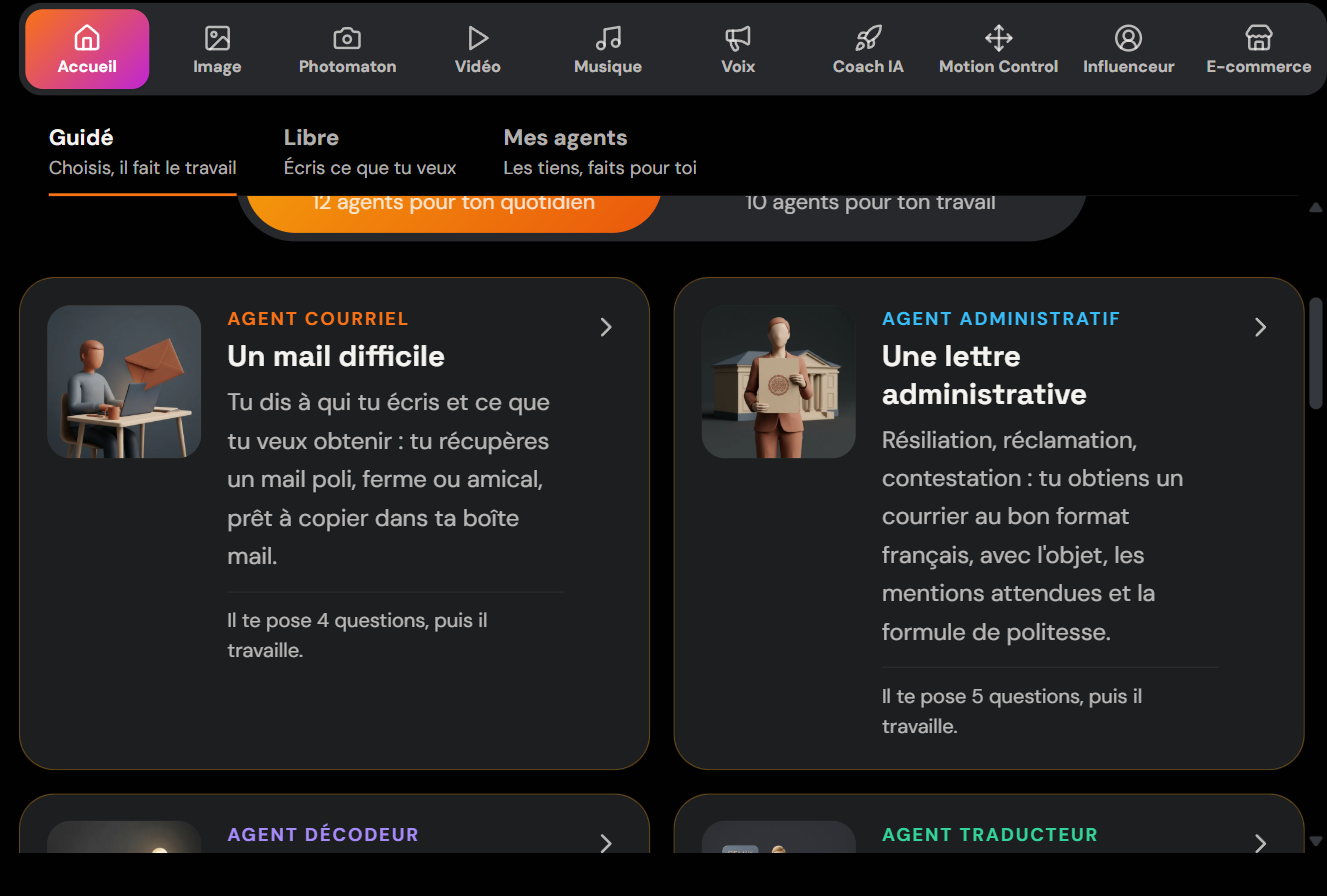
In practice, you open the AI Lab, go to the Home tab, then to the Guided section. You select the writing agent, and it asks you for the essentials: the role you're after, the company, your two or three most relevant experiences, and what genuinely draws you to the offer. Because the letter starts from your concrete answers and not from an empty template, it contains the details recruiters are looking for right away. You get a personalized base that you just have to proofread and adjust.
The advantage for a complete beginner is that you don't have to learn anything about the art of prompting. The agent does the framing work for you. And since usage credits are included, you don't need to juggle several paid subscriptions to give it a try. If you want to go further afterward (writing tough emails, official documents, prepping for an interview), you'll find the same logic in the different programs on the Skilzy platform, designed to teach you how to use AI on real everyday situations.
Method 2: Guide ChatGPT With a Good Prompt
If you'd rather work directly in ChatGPT, the quality of your letter depends entirely on how precise your request is: a vague prompt gives a vague letter. Most people type "write me a cover letter for a sales associate role" and get, no surprise, the generic text recruiters hate.
For a good result, give the AI the raw material it doesn't have. An effective prompt looks like this:
You are a candidate applying for the role of [job title] at [company]. Here are my three most relevant experiences: [describe]. Here's exactly why this company interests me: [name a real project, value, or product]. Write a cover letter of 250 words maximum, natural and direct in tone, with no canned phrases like "drawing on my experience." Highlight a quantified result if possible.
The more you fill the brackets with real elements, the more the letter sounds like you. You can then ask for tweaks: "make the second paragraph more concrete," "cut the empty sentences," "shorten the introduction." It's this back-and-forth work that makes the difference between an acceptable letter and a convincing one.
If you're new to the tool, start by understanding its basics: our guide to using ChatGPT as a beginner shows you how to frame clear requests. And to practice writing better instructions, this collection of 50 useful everyday prompts offers reusable templates, including for the job hunt.
Method 3: Start From an Online Letter Template
A cover letter template found online can serve as a skeleton, but it becomes a trap if you copy it without reworking it. Recruiters have been seeing the same frameworks go by for years: copying a template word for word means blending into the crowd rather than standing out.
The smart way to use a template is to keep the structure (hook, what you bring, why this company, closing line) and completely replace the content with your own. Public services like France Travail offer free guidelines on what an application should contain, giving you a reliable framework so you don't forget anything.
You can also combine the methods: take the structure of an official template, fill it with your real elements, then ask the AI to smooth the whole thing out and eliminate repetition. You get the best of both worlds, a solid framework and text that sounds like you. The key stays the same: no template, however good, knows your background for you.
Personalize Your Letter So It Sounds Human
For an AI-written letter to pass the recruiter test, the rule is simple: add what no machine can invent, meaning your own details. Personalization isn't an optional step, it's what turns a correct text into a credible application.
A few habits that make all the difference:
- Name a specific detail about the company. A recent project, a stated value, a product you use. One concrete sentence beats three generic compliments.
- Add a quantified result. "I increased sales by 15% in six months" or "I managed a portfolio of 40 clients." Numbers anchor your letter in reality.
- Read it out loud. If a sentence doesn't sound like you, rewrite it in your own words. A small natural imperfection beats robotic perfection.
- Cut the canned phrases. Delete every sentence that could appear in any letter. What you keep should be true for you alone.
- Check that it's consistent with your résumé. The letter extends the résumé, it doesn't contradict it.
In practice, budget five to ten minutes of active proofreading after generating it. That's not much, and it's precisely where the gap opens between an ignored application and one that gets picked.
In Short
Using AI for your cover letter is nothing to be disqualified over: what costs you is sending its first response untouched. Whether you go through a guided agent, a well-built prompt in ChatGPT, or a reworked template, the key stays your personalization. Give the tool your real experiences, your real numbers, a real detail about the company, and always proofread before sending. You keep the speed of the machine and get back what no recruiter can ignore: your voice.