
A LinkedIn post that falls flat is almost always the same story: you spend twenty minutes writing it, you hit publish with a little pride, and three hours later you've got two likes (one of them from your cousin). The problem is almost never your profile or your follower count. It's how the post is built. On LinkedIn, a reader decides in about a second and a half whether to keep going or move on to the next post, and that decision comes down to your first three lines.
Good news: writing a post that hooks people isn't some innate talent. It's a structure you repeat, a few simple habits, and a bit of method. Over the next few minutes, you'll see why your posts stall, what the anatomy of a post that works looks like, three ways to write one (from the fastest to the most hands-on), a concrete before/after example, and the mistakes that quietly kill your reach without you even knowing.
Why Your LinkedIn Post Falls Flat
Your post falls flat because your first three lines give no reason to click "see more." In the feed, LinkedIn cuts off your text after roughly 3 lines on mobile. If those lines announce something obvious ("Today I wanted to share a thought..."), nobody expands the rest, and the algorithm concludes that your post isn't interesting. Fewer opens in the first hour, less reach afterward. The cycle is automatic.
The other reasons always trace back to the same causes:
- No point of view. A post that could have been written by anyone triggers no reaction. LinkedIn rewards taking a stance, not safe, consensus-friendly clichés.
- Too much jargon. "Synergy," "growth levers," "ecosystem": these words drain your sentence of meaning and wear the reader out.
- A dense wall of text. Eight-line paragraphs stacked on top of each other make people bail on mobile. The eye needs room to breathe.
- Zero invitation to react. A post that ends with no question or opening gives nobody a reason to comment, and it's the comments that carry a post far.
Here's the key takeaway: it's not the ideas that are missing, it's how you stage them.
The Anatomy of a LinkedIn Post That Hooks
A good LinkedIn post follows a simple structure: a hook that stops the scroll, some breathing room, one single strong idea backed by proof, then an invitation to react. You don't need to be a writer, you need a reliable skeleton you reuse every time.
Here's the framework that works for most text formats:
- The hook (1 line). A short sentence that creates tension, surprise, or a clear promise. Example: "I lost a $4,000 client over a typo."
- The breathing room. A line break, then short sentences. One idea per line. White space is your friend.
- The body (one single idea). You develop ONE message, not five. A story, a lesson learned, a method. The reader should be able to sum up your post in one sentence.
- The proof. A number, a specific example, a concrete result. "Ever since, I proofread every quote twice: zero errors in 6 months."
- The call to react. An open question or an invitation to share an opinion. "What about you, do you read your quotes out loud or trust your eye?"
This structure works because it respects how we read on a phone: fast, skimming, with a thumb ready to scroll. If you want to go further on producing content regularly, our article on AI workflows to create content 10x faster breaks down how to keep up a publishing rhythm without burning out.
Writing Your Post: 3 Methods, From Fastest to Most Hands-On
The simplest method for a beginner is to start from a guided agent that asks you the right questions and drafts the first version, then adjust it to your voice. Here are the three approaches, from the fastest to the most artisanal. Pick the one that matches your level and the time you have.
Method 1: The guided agents in the Skilzy AI Lab
This is the most direct route when you don't know where to start. Skilzy is a French platform for learning and using AI, with a built-in "AI Lab": you use the real tools right inside the app, credits included, without piling up subscriptions. Among those tools, the guided agents work like an assistant that asks two or three questions, then writes for you.
The idea is built for complete beginners: you pick an agent, it asks you about your topic, your goal, and your audience, and it hands you a structured first draft that you just have to personalize.
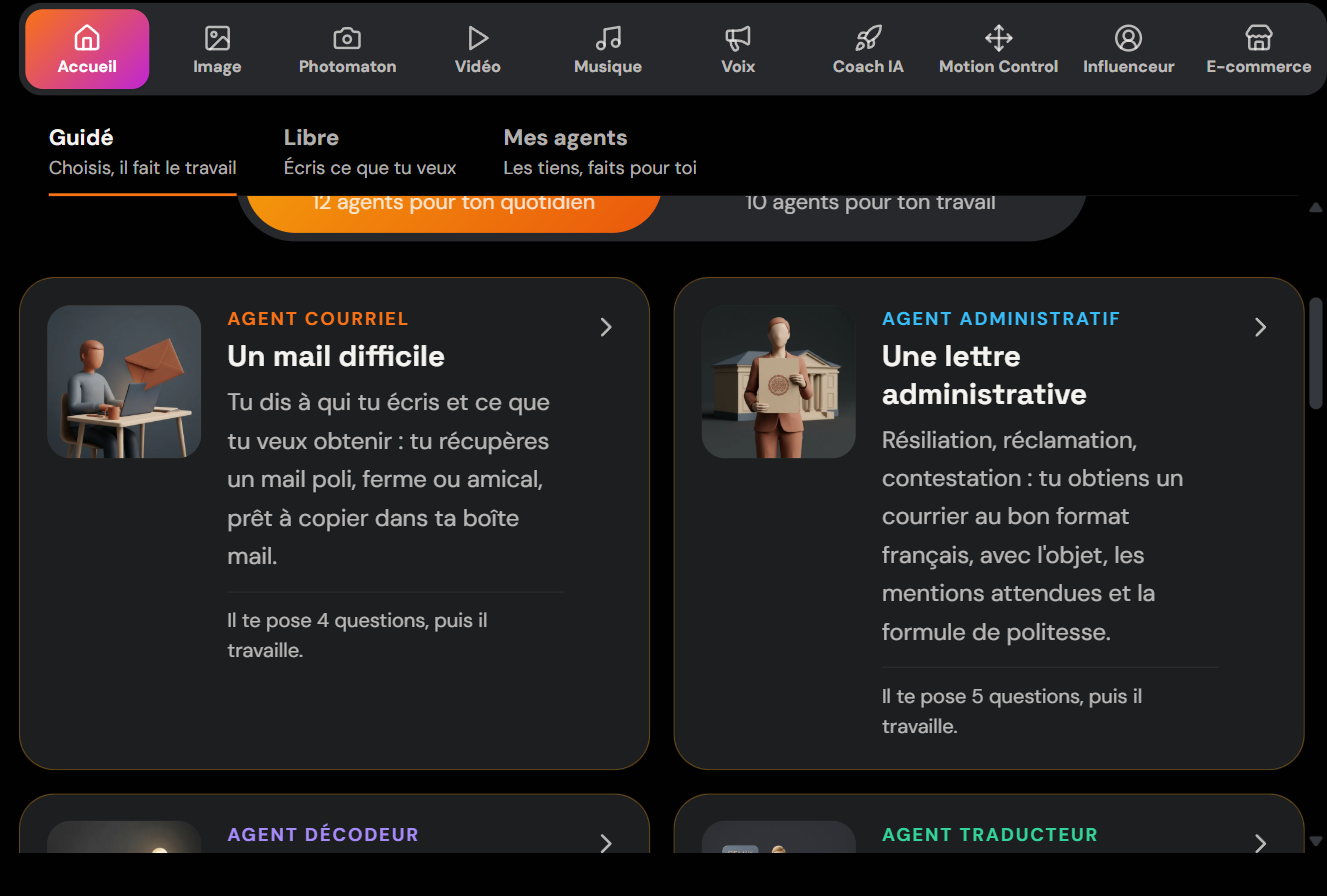
You'll find these agents in the AI Lab, under the Home tab, in the Guided section. The advantage over a blank page: you never start from scratch, and the tool forces you to nail down your angle before writing, which already fixes half the posts that fall flat.
If your goal is to turn it into an acquisition channel to sell your services, Skilzy's course to become an AI freelancer teaches you how to turn your LinkedIn presence into real projects.
Method 2: A general-purpose AI tool with a good prompt
A tool like ChatGPT or Claude can write a decent post, as long as you give it a precise framework. The classic mistake is typing "write me a LinkedIn post about X": you get lukewarm text, full of jargon, with a limp hook. The quality of your request makes all the difference.
A prompt that works looks like this:
"You're a LinkedIn writer. Write a 150-word post about [topic]. Audience: [who]. Goal: [reaction you want]. Start with a one-line hook that creates tension. Short sentences, one idea per line, zero corporate jargon. End with an open question. Tell it based on this real anecdote: [your story]."
Always give it real material (an anecdote, a number, a failure): the AI shapes it, it doesn't invent your experience. It's your concrete proof that makes the post credible. To dig deeper into the art of phrasing your requests, our guide on 8 realistic ways to make money with AI shows how these prompting habits pay off well beyond LinkedIn.
Method 3: By hand, with a framework
Writing it yourself is still the best way to find your voice, as long as you lean on a framework. Take the 5-point structure from the previous section and fill it in like a form. First write ten possible hooks, keep the punchiest, toss the rest. Then develop a single idea. Read it out loud: if you stumble on a sentence, so will your reader.
This method is the slowest, but it's the one that builds your style over the long run. Many effective creators combine all three: AI to break through the blank page, hands-on work for the finishing touch and the personal tone.
An Example of a LinkedIn Post That Works (Before / After)
The best way to understand what hooks people is to compare two versions of the same message. Let's take a consultant who wants to talk about the importance of following up with clients.
Before (the post that falls flat):
"Client follow-up is an essential topic for any business. Many professionals underestimate its importance. In this post, I share a few thoughts on follow-up best practices and the levers to activate to optimize your conversion rate. Feel free to reach out."
The problem: no hook, jargon ("levers," "optimize"), no example, no emotion, no question. Nobody expands "see more."
After (the post that hooks):
"A prospect told me no. Three weeks later, he signed.
The only thing I changed: I followed up once, without pushing, with a single sentence.
"I've been thinking back to our conversation, is this still relevant for you?"
No follow-up = no sale. Most "no"s are just "not right now."
What about you, how many times do you follow up before you let go?"
Same message, but with a hook that creates tension, a true story, lines that breathe, a concrete sentence you can copy, and a question that invites comments. This is the kind of post that turns readers into prospects. If your goal is precisely to attract clients, the article on generating qualified leads with AI rounds out this logic nicely.
The Mistakes That Kill Your Reach
Some habits quietly shrink the number of people who see your post, even when it's well written. Knowing them keeps you from sabotaging your own work.
- Putting an external link in the body of the post. LinkedIn favors content that keeps people on its platform. Put your link in the first comment and mention it in the post.
- Piling on hashtags. Three relevant hashtags are enough. Ten generic hashtags don't help and look amateurish.
- "Engagement bait." Writing "Comment YES to get my guide" is penalized by the platform's rules, as LinkedIn's official marketing blog points out. A genuine open question is better.
- Publishing then disappearing. The first hour decides everything. Stay available to reply to comments: every reply revives your visibility.
- Posting at the wrong time. Publish when your audience is active (often weekdays, in the morning). A great post published on a Sunday at 11 p.m. goes unnoticed.
To post regularly without spending your evenings on it, you can lean on the principles of automating your business with AI and prepare your content in batches.
Key Takeaways
A LinkedIn post that hooks isn't a matter of luck or followers. It's a hook that stops the scroll, a single clear idea, sentences that breathe, concrete proof, and an invitation to react. Start with a guided agent or a good prompt to break through the blank page, add your voice, publish at the right time, and stay present in the first hour. Write one tomorrow, measure, adjust. Consistency does the rest.